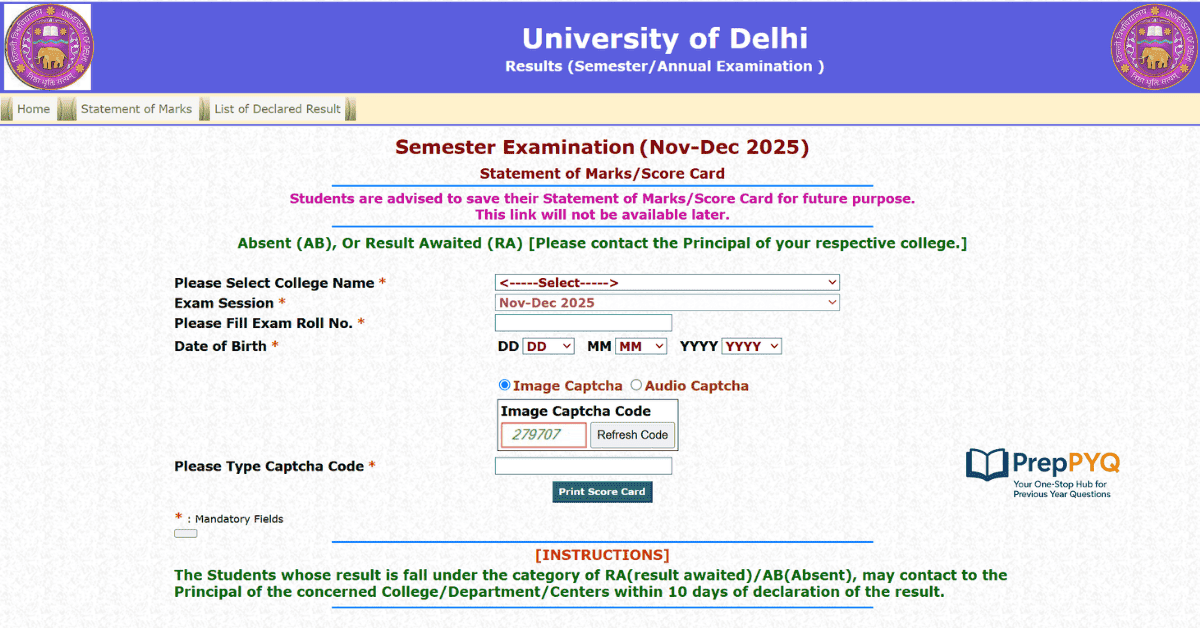
Delhi University School of Open Learning (DU SOL) has become one of the most preferred choices for students who want to continue their education while managing jobs, competitive exam preparation, businesses, or personal responsibilities. Every semester, thousands of students eagerly wait for the DU SOL results to evaluate their academic performance and plan their next semester.
If you have recently appeared in the DU SOL examinations, this guide will help you understand everything about the result process. From checking your semester result online to downloading your marksheet and understanding important details mentioned on the scorecard, this article covers every essential aspect in simple language.
Whether you are pursuing BA, BCom, BBA, BMS, MA, MCom, or other undergraduate and postgraduate courses, this guide is designed to answer your common questions and make the result-checking process easier.
📢 Details Mentioned on DU SOL Result
| Details | Description |
|---|---|
| Student Name | Candidate’s Full Name |
| Enrollment Number | University Enrollment ID |
| Roll Number | Examination Roll Number |
| Course Name | BA, BCom, MA, etc. |
| Semester | Current Semester |
| Subject Names | All Appeared Subjects |
| Subject-wise Marks | Marks Obtained |
| Credits | Credits Earned |
| Grade | Grade Awarded |
| Result Status | Pass/Fail/ER |
| Total Marks | Overall Score |
🔔 DU SOL Result 2026: Direct Link to Check SOL UG & PG Results Online
| DU SOL Result 2026 | Download Here. 👇 |
| DU SOL BA, BCom, BBA, BMS & PG 📢 | Click Here |
🔔 How to Download DU SOL Result 2026 BA, BCom, BBA, BMS & PG
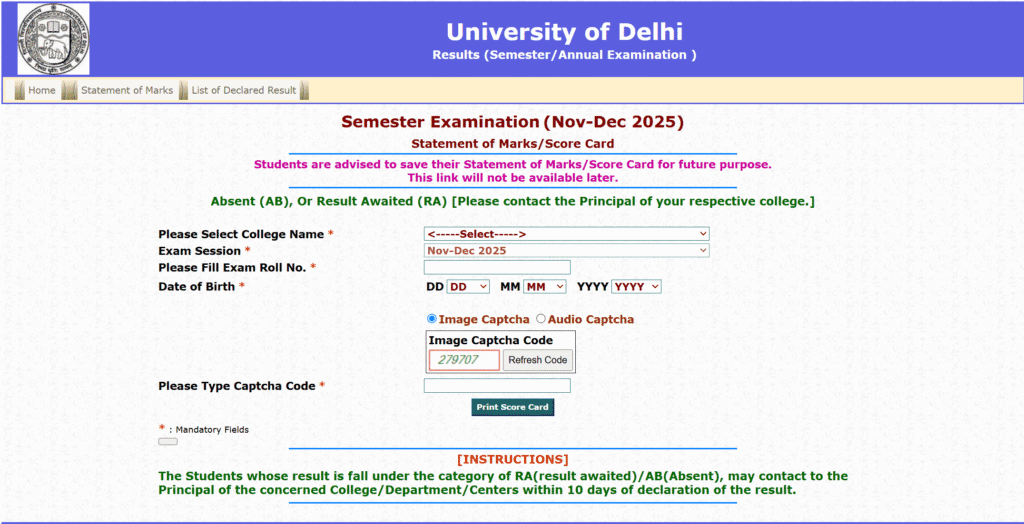
1. Visit the Official Website
Go to the official DU SOL Examination Portal.
2. Open the Results Section
Click on the “Results” or “Semester Result” link available on the homepage.
3. Select Your Course
Choose your course, such as BA, B.Com, BBA, MA, M.Com, or any other UG/PG program.
4. Choose the Semester
Select the semester for which you want to check the result.
5. Enter Your Credentials
Fill in the required details, including: Exam Roll Number
SOL Roll Number (if applicable)
6. Click on the “Submit” button.
After entering the details, click Submit or View Result.
7. Check Your Result
Your DU SOL result will be displayed on the screen with subject-wise marks and overall result status.
8. Download the Result
Click on the “Download” or “Save as PDF” option to save your result.
9. Print a Copy
Take a printout of the downloaded result for admission, document verification, or future reference.
Tip: Keep your roll number and enrollment number handy before checking your DU SOL result to avoid any delays.
Also Check Out ⬇️:
| DU Previous Year Question Paper | DU BCom Previous Year Question Papers |
| DU BSc Previous Year Question Papers | DU SOL B.Com previous year papers |
| DU BA previous year question papers |
✅ How to Check Your DU SOL Result on sol.du.ac.in
What You’ll Need Before You Start
Keep these ready so you’re not scrambling mid-process:
- Your SOL roll number
- Your exam roll number (if applicable to your course)
- Date of birth (used for verification on some result formats)
- A stable internet connection—the portal tends to slow down right after a result is announced, when thousands of students log in at once
Step-by-Step Process
- Go to the official portal: sol.du.ac.in
- Look for the “Examination” or “Result” section on the homepage
- Select the “Marksheet/Result” option from the dropdown
- Enter your roll number and exam roll number, and choose your course, part, and year
- Click “Show” or “Submit.”
- Your result will appear on screen—download and save the PDF immediately
A tip worth remembering: don’t wait to screenshot or download it later. Portals can get overloaded during peak hours, and you don’t want to be locked out right when you need it.
📝 Understanding Your Result Status (RA, Ab, ER, and More)
This is where a lot of students get caught off guard, because the portal doesn’t always spell things out in plain English. Here’s what the common statuses actually mean:
- RA (Result Awaited): Your result hasn’t been processed yet. Nothing to worry about — check back in a few days.
- Ab (Absent): You’ve been marked absent. If you did appear for the exam, this needs to be corrected — don’t ignore it.
- ER (Essential Repeat): This is the one that trips people up. You can have a decent-looking total mark and still carry an ER if you didn’t clear the minimum in one specific paper or component. Always check the subject-wise breakdown, not just your total.
- No Record Found: This usually means your result is declared, but your data hasn’t been uploaded to that particular search view yet. Try again after 12–24 hours before you panic.
📝 What to Do If You Fail or Spot an Error
First, don’t assume the worst from a single glance at your total. Go through each paper individually. If you genuinely see an error, a marked absence despite attending, or a paper you believe deserves a recheck, you have options.
📝 Applying for Revaluation on the Samarth Portal
- Log in to the Samarth Portal with your student credentials
- Navigate to Exam → Revaluation/Re-checking
- Select the specific subject(s) you want reviewed
- Pay the prescribed revaluation fee online
- Submit before the deadline—this window typically opens within 10–15 days of the result declaration and doesn’t stay open long
If you were marked absent despite attending the exam, that’s a separate process—you’ll usually need to visit the SOL office (North or South Campus) within 15 days with your signed attendance sheet and admit card for verification.
📝 Courses Covered Under DU SOL Result
Students from the following programs can check their results online.
| Undergraduate | Postgraduate |
|---|---|
| BA Programme | MA Hindi |
| BA (Hons.) | MA History |
| BCom Programme | MA Political Science |
| BCom (Hons.) | MCom |
| BBA | MA Sanskrit |
| BMS | MA Urdu |
⬇️ What Should You Do After Checking Your Result?
After viewing your result, students should:
- Verify all personal details.
- Check subject-wise marks carefully.
- Download multiple copies of the result.
- Keep the result PDF safe.
- Apply for revaluation if required.
- Prepare for the next semester.
DU SOL Revaluation Process
Students who believe their marks do not reflect their performance can apply for revaluation or rechecking within the prescribed deadline announced by the university.
Generally, the process includes:
- Online application
- Payment of the applicable fee
- Subject selection
- Submission of request
After re-evaluation, revised marks are updated if any changes occur.
DU SOL Result Status Explained
| Status | Meaning |
|---|---|
| Pass | Successfully Cleared |
| Fail | Minimum Marks Not Obtained |
| ER | Essential Repeat |
| Absent | Did Not Appear |
| Withheld | Result Temporarily Withheld |
Common Problems While Checking DU SOL Result
Sometimes students face technical issues while accessing their results.
Common reasons include:
- Heavy website traffic
- Incorrect roll number
- Slow internet connection
- Browser cache issues
- Temporary server maintenance
Refreshing the page after some time usually resolves these issues.
💬 FAQs on DU SOL Result
1. How can I check my DU SOL result 2026 online?
You can check your DU SOL result by visiting the official DU SOL result portal, selecting your course and semester, entering your roll number or required credentials, and clicking on the Submit button.
2. What details are required to check the DU SOL result?
Generally, you need your Exam Roll Number and, in some cases, your SOL Roll Number or Enrollment Number to access your result.
3. Is the DU SOL result available for all UG and PG courses?
Yes, DU SOL publishes results for various undergraduate and postgraduate programs, including BA, B.Com, BBA, BMS, MA, M.Com, and other eligible courses.
4. Can I download my DU SOL marksheet online?
Yes, after your result is declared, you can download the provisional scorecard online. The original marksheet is issued separately by the university.
5. What should I do if my DU SOL result is not showing?
If your result is unavailable, verify your login details, refresh the page, clear your browser cache, or try again later. If the issue persists, contact the DU SOL examination branch.
6. What does “ER” mean in the DU SOL results?
ER (Essential Repeat) indicates that you need to reappear in one or more subjects as per the university’s examination rules.
7. Can I apply for revaluation after the DU SOL result is announced?
Yes, students who are dissatisfied with their marks can apply for revaluation or rechecking within the deadline announced by DU SOL.
8. How long does DU SOL take to declare semester results?
The university generally releases semester results 4 to 8 weeks after the completion of examinations. However, the timeline may vary depending on the evaluation process.
9. Is the online DU SOL result valid for government jobs and higher education?
The online result serves as a provisional document. For official verification, students should use the original marksheet issued by Delhi University.
The DU SOL Result 2026 is more than just an academic outcome—it serves as a valuable checkpoint in every student’s educational journey. Whether you are pursuing an undergraduate or postgraduate program through the Delhi University School of Open Learning, your semester result provides a clear picture of your progress and highlights areas where you can improve.
Since DU SOL is designed to support flexible learning, many students balance their studies with work, competitive exam preparation, or personal responsibilities. Checking your result on time helps you stay informed and plan your next steps with confidence.
After downloading your result, carefully verify all the details, including your name, roll number, course, semester, and subject-wise marks. If you notice any discrepancy or feel that your marks do not accurately reflect your performance, make sure to apply for revaluation or contact the university within the prescribed timeline. Keeping a digital copy and a printed copy of your result is also recommended, as you may need them for admissions, scholarships, internships, or future employment opportunities.
Remember that one semester’s result does not define your overall academic potential. If your score meets your expectations, use it as motivation to maintain consistency in future semesters. If your performance is lower than expected, treat it as an opportunity to identify your weak areas, refine your study strategy, and come back stronger. Learning is a continuous process, and every examination contributes to your personal and professional growth.
We hope this complete guide on the DU SOL Result 2026 has helped you understand how to check your result, download your scorecard, interpret your marks, and take the appropriate next steps. Stay connected with official university announcements for the latest updates on results, revaluation, marksheets, and upcoming examination schedules. Wishing you continued success in your academic journey and all the best for your future endeavors.

Founder of PreppyQ.in | Education Entrepreneur | SEO Content Creator
Passionate about helping students achieve their academic and career goals through quality educational resources. Founder of PreppyQ.in, a platform dedicated to providing Previous Year Question Papers, Mock Tests, Study Materials, and Exam Preparation Resources for UPSC, SSC, Banking, Railway, Teaching, and other competitive examinations. Focused on building accessible and student-friendly learning solutions while leveraging SEO and digital innovation to reach millions of learners across India.
3 thoughts on “DU SOL Result 2026: Check Semester Result on sol.du.ac.in”